







Live FNAF4.io

FNAF Strike 2

Play FNAF Strike 2 online free on fnaf4.io. This game is a first-person horror shooter game built around moving, aiming, firing, gathering supplies, and...

Browser Instant Play Survival - Animatronic
New Drops
See all
Game Description
FNAF Strike 2 gameplay

1. Game Overview

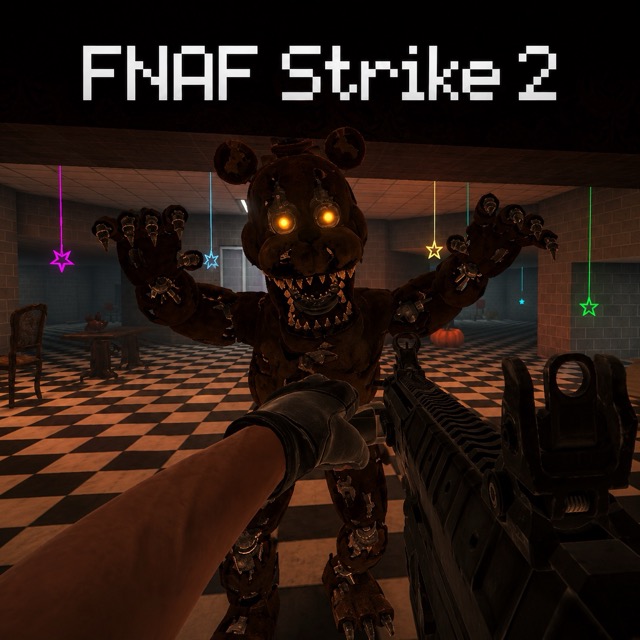
FNAF Strike 2 is a first-person horror shooter game built around moving, aiming, firing, gathering supplies, and choosing defensible positions. You play as an armed survivor hunted inside a hostile mascot facility inside industrial halls and combat rooms with limited escape routes. The premise is easy to understand, but the main pressure comes from relentless mascot enemies that attack in groups. The tension is practical as well as atmospheric: enemies attack from several angles while a badly timed reload or narrow corner can remove every escape option. The core experience asks you to fight through the facility and survive every attack sequence. Progress comes from learning the environment and understanding how the game's main systems interact. Early attempts are useful even when they end badly, because they reveal rules, timing, useful patterns, and the consequences of different decisions. Once those patterns become familiar, the challenge changes from confusion into controlled decision-making. Close-range pursuit and shooting create a more aggressive alternative to camera-based FNAF games. That identity gives the game a clear reason to try even for players who already know the wider horror and survival-game formula. Sessions usually fit into 20–40 minutes per run, making the game suitable for a focused play break while still leaving room for repeat attempts and improvement. It is best for players who want fast action, mascot horror, and survival combat. New players can begin by following the visible objective and mastering one system at a time; experienced players can optimize decisions, reduce wasted actions, and pursue cleaner completions. Prioritize clear sightlines and stable performance; smooth mouse control is more valuable than maximum visual settings.

Key Details:

FieldDetails
GenreFirst-Person Horror Shooter
Difficulty LevelHard
Average Play Time20–40 minutes per run
Best ForPlayers who want fast action, mascot horror, and survival combat

2. How to Play

Getting Started:

  1. Launch FNAF Strike 2, allow the embedded game to finish loading, and read the first objective or instruction before clicking through it.
  2. Use the opening safe moments to test the movement and interaction controls; identify which inputs are actually enabled in this browser build.
  3. Check movement, aim, fire, and reload controls, then identify an open route that can be used as a combat loop.
  4. Observe the first wave long enough to distinguish fast attackers, durable targets, and ranged or special threats.
  5. Work toward the main goal—fight through the facility and survive every attack sequence—in small, confirmed steps rather than attempting several unfamiliar actions at once.

Basic Controls:

  • WASD or Arrow Keys — move
  • Mouse — aim
  • Left Click — fire
  • R — reload when manual reloading is enabled
  • Shift — sprint
  • Number Keys or Mouse Wheel — switch weapons when available
  • Esc — pause

Objective: Fight through the facility and survive every attack sequence. Success comes from understanding the warning cues, completing required interactions in a safe order, and preserving enough time or resources to answer the next threat.

3. Game Features & Highlights

  • Distinct setting — Industrial halls and combat rooms with limited escape routes gives the game a recognizable visual and strategic identity.
  • Focused core loop — Moving, aiming, firing, gathering supplies, and choosing defensible positions keeps every action connected to survival or progress.
  • Readable mastery path — The combat and target priority system rewards knowledge gained across repeated attempts.
  • Meaningful pressure — The presence of relentless mascot enemies that attack in groups forces the player to prioritize instead of checking everything safely.
  • Strong replay appeal — Close-range pursuit and shooting create a more aggressive alternative to camera-based FNAF games.

4. Tips & Strategies

Beginner Tips:

  • Keep moving through a planned loop, eliminate the closest high-risk enemy, and reload only with created distance.
  • Use ammunition deliberately and collect supplies when the route is clear rather than in the middle of a surrounding wave.
  • Aim at one target until it is removed; spreading damage across the whole group leaves every threat active.

Advanced Strategies:

  • Master firing controlled bursts and learning which enemies demand immediate focus so routine decisions require less attention.
  • Plan around when to hold a strong position and when staying still has become unsafe; the best move often solves the present danger while preserving an answer for the next one.
  • Use failed runs as timing data. Record where the pattern changed, then adjust one part of the route or routine instead of changing everything.

What to Watch Out For:

  • Pitfall 1 — Backing into an unexplored corner can trap the player during a reload. Fight toward known open space.
  • Pitfall 2 — Reloading after every short burst wastes safe time. Reload when the magazine or distance actually requires it.

5. Game Elements Explained

Combat and Target Priority: The combat and target priority system governs aiming efficiently and removing the enemy that creates the greatest immediate danger in FNAF Strike 2. The player rarely has enough safety to inspect every possibility. Use a short cycle: confirm the objective, check the highest-risk condition, take one deliberate action, and verify the result. That rhythm stops uncertainty from becoming an emergency. The central decision is which target must fall first and whether there is time to reload. Separate confirmed information from assumptions, then choose the least expensive action that solves the current problem. This preserves time, resources, or safe positioning for what comes next. After a failure, remember the last reliable cue and the action that followed it; this pair provides useful evidence for the next attempt. Mastery comes from firing controlled bursts and learning which enemies demand immediate focus. Practice during calmer moments, but interrupt the routine whenever relentless mascot enemies that attack in groups create an urgent exception. A consistent process reduces mental load and supports the real goal: fight through the facility and survive every attack sequence.

Movement, Space, and Survival: The movement, space, and survival system governs controlling distance, cover, ammunition, and escape lanes in FNAF Strike 2. The player rarely has enough safety to inspect every possibility. Use a short cycle: confirm the objective, check the highest-risk condition, take one deliberate action, and verify the result. That rhythm stops uncertainty from becoming an emergency. The central decision is when to hold a strong position and when staying still has become unsafe. Separate confirmed information from assumptions, then choose the least expensive action that solves the current problem. This preserves time, resources, or safe positioning for what comes next. After a failure, remember the last reliable cue and the action that followed it; this pair provides useful evidence for the next attempt. Mastery comes from moving in wide, planned loops while collecting supplies without entering dead ends. Practice during calmer moments, but interrupt the routine whenever relentless mascot enemies that attack in groups create an urgent exception. A consistent process reduces mental load and supports the real goal: fight through the facility and survive every attack sequence.

6. Frequently Asked Questions

Q: How do I make progress in FNAF Strike 2?

A: Follow the current objective, learn the first active system, and confirm each completed step before moving on. The overall goal is to fight through the facility and survive every attack sequence. Change target priority first, then adjust movement. Removing a fast or blocking enemy earlier often makes the whole wave manageable.

Q: What should I do if I keep failing at the same point?

A: Identify the final warning cue before the failure and decide which action had priority. Practice firing controlled bursts and learning which enemies demand immediate focus. Change one decision per attempt so it is clear which adjustment actually works.

Q: Is this game compatible with mobile devices and modern browsers?

A: The embedded version is best played in an up-to-date desktop browser such as Chrome, Edge, Firefox, or Safari. Mobile support varies because some builds require a keyboard, mouse capture, precise cursor input, or WebGL. If controls do not appear on a phone or tablet, switch to desktop.

Q: Can I save my progress?

A: Save behavior depends on the embedded build. If the game provides Save, Continue, chapter select, or browser local-storage support, use it before closing the tab. If no save indicator appears, assume the current run may reset after a refresh and complete the active night, match, or chapter in one session.

Q: How do I unlock later nights, routes, or features?

A: Advance through cleared areas to reach later encounters; finish the facility route to complete the game.

Comments (0)
Sort by Newest
Add a Comment